StarCast · TriCast · Settings Guide

LightCast

Best Camera Settings for Milky Way

The right settings depend on your lens and sensor. Here's the framework — and how LightCast TriCast calculates the exact shutter limit for your specific gear.

Calculate Your Settings — iOS App Learn more →

iOS app: $2.99/mo · 7-day free trial · Cancel anytime
Starting point settings

The Standard Milky Way Exposure Triangle

Milky Way photography has three hard constraints: aperture needs to be wide to gather light, shutter speed needs to be short enough to avoid star trails, and ISO fills the remaining exposure gap. The shutter limit is the variable most photographers get wrong because it changes with focal length and sensor crop factor.

🔆
Aperture: As Wide as Your Lens Allows
f/2.8 is the practical standard. f/1.8 or f/2.0 primes collect significantly more light and allow lower ISO. Avoid stopping down — even f/4 cuts light collection in half compared to f/2.8, forcing a full stop more ISO or longer shutter exposure.
⏱️
Shutter Speed: The 500 Rule
Divide 500 by your focal length in mm to get maximum seconds before star trailing begins. 24mm full-frame = ~20 seconds. 24mm on APS-C = ~13 seconds. TriCast calculates this precisely for your camera's sensor and crop factor — the generic 500 rule is an approximation.
📈
ISO: 3200 as a Starting Point
ISO 3200 works well on most modern full-frame cameras. Crop sensors and older bodies perform better at ISO 1600 to 3200. High-performance cameras (Sony A7S III, Nikon Z6 III) can push to 6400 or beyond. Always shoot RAW and evaluate noise before committing to a setting.
🎯
Focus: Manual at Infinity
Set to manual focus, rotate to the infinity mark, then back off slightly — most lenses focus past true infinity. Confirm with live view at maximum magnification on a bright star before shooting. Once locked, mark the focus ring position with tape.
LightCast TriCast
Conditions matter as much as settings

Good Settings on a Bad Night Still Fail

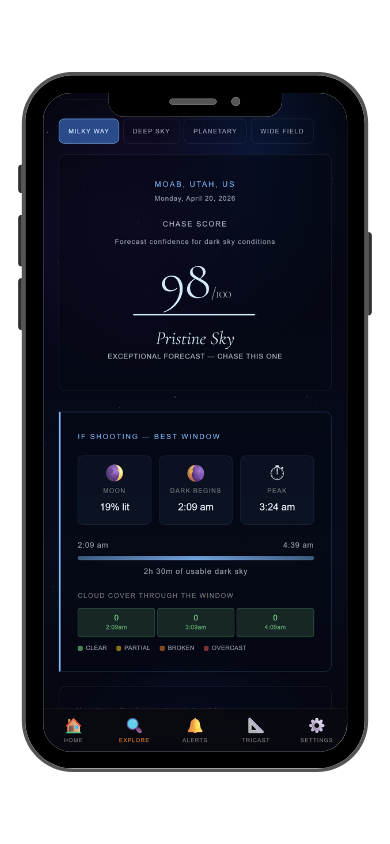
The best camera settings can't overcome a bright moon, heavy cloud cover, or poor atmospheric transparency. Planning the night is as important as dialing the settings. StarCast scores tonight's conditions using Bortle class, moon phase, cloud cover, and transparency — so you know whether it's worth going out before you pack the car.

🔔
StarCast Push Alerts
Get notified when tonight looks good. StarCast alerts you when moon phase, Bortle class, and cloud cover combine for a high-scoring night. Exclusive to the iOS app — so you're spending time shooting, not checking forecasts.
Common Questions
What are the best Milky Way camera settings?
Start at f/2.8 or wider, shutter speed calculated by the 500 rule for your focal length, ISO 3200, manual focus at infinity. LightCast TriCast calculates the precise shutter limit for your camera and lens — free on the web or in the iOS app.
What is the 500 rule for astrophotography?
Divide 500 by your focal length in mm to get the maximum shutter speed before star trailing. On a full-frame 24mm lens that's roughly 20 seconds. On a crop sensor, the effective focal length is longer, so the limit is shorter. TriCast calculates the exact number for your gear.
What ISO should I use for the Milky Way?
ISO 3200 is the standard starting point for most modern cameras. Full-frame sensors with strong high-ISO performance can push to 6400 or higher. Crop sensors and older bodies tend to produce cleaner results at 1600 to 3200. Always shoot RAW so noise can be managed in post.
Does aperture matter a lot for Milky Way photography?
Yes. Each full stop of aperture doubles or halves the light hitting the sensor. Going from f/4 to f/2.8 lets in twice as much light, allowing one full stop lower ISO or shorter shutter speed. Wide aperture primes (f/1.8, f/2.0) are a significant advantage for Milky Way work.
What is LightCast TriCast?
TriCast is LightCast's camera reference tool. It calculates depth of field, hyperfocal distance, the 500 rule shutter limit for any camera and focal length, and other field calculations. Free on web at lightcastsuite.com/tricast and in the LightCast iOS app.
LightCast
Calculate your settings. Check the sky. Shoot.

500 rule calculator · Depth of field · Hyperfocal distance
Night sky score · Moon phase · Push notifications

Download LightCast for iOS
or
Use TriCast free on web →

$2.99/mo after 7-day free trial · Cancel anytime in App Store