DroneCast Β· Camera Settings Guide
LightCast

Best Drone Camera Settings for Aerial Photography

Shutter speed, ISO, ND filters, and white balance all depend on the light conditions before you launch. Here's how weather determines which settings to reach for first.

Check Flight + Light Conditions β€” iOS App Check today's conditions free on web β†’

iOS app: $2.99/mo Β· 7-day free trial Β· Cancel anytime

Settings and conditions together

Why Weather Determines Your Starting Settings

Camera settings for aerial photography aren't a fixed formula β€” they change with light conditions. Knowing what light you're flying into before launch means you can set the camera correctly before takeoff, not waste flight time adjusting mid-air. Check conditions first, set camera second.

⏱️
Shutter Speed: The 180-Degree Rule
For video, set shutter speed to double your frame rate: 1/60 at 30fps, 1/100 at 50fps. This produces natural motion blur. For stills, faster shutter freezes motion β€” aim for 1/500 or faster in bright conditions. In overcast flat light, you may not need ND filters to reach the correct shutter speed. In bright sun, ND4 or ND8 is typically required to avoid overexposure at the correct shutter.
πŸ”²
ND Filters: Matched to Brightness
ND filters reduce light entering the sensor without affecting depth of field. In bright midday sun, ND8 or ND16 is typically needed to maintain correct shutter speed. At golden hour with lower light, ND4 or no filter. Overcast requires no ND in most cases. Having ND4, ND8, and ND16 covers the majority of outdoor conditions.
🌑️
ISO: Keep It Low
Most drone cameras perform best at base ISO (typically 100). Raise ISO only when light genuinely requires it β€” overcast at dusk, shaded terrain, or low-light golden hour. Noise from high ISO is amplified in aerial footage more than ground-level photography because sky and smooth terrain show grain clearly. Let shutter and ND do the work; keep ISO low.
🎨
White Balance: Manual for Consistency
Auto white balance shifts during a flight as the drone pans across different surfaces β€” blue sky, green terrain, warm sunlight β€” creating inconsistent colour in edits. Set white balance manually before takeoff: 5500–6000K for sunny conditions, 6500–7000K for overcast, 3200–4000K for golden hour. Consistent WB across a flight makes editing significantly easier.
Bright Midday Sun
ISO 100 Β· ND8–ND16 Β· 1/60–1/100 (video) Β· WB 5500K
Overcast / Flat Light
ISO 100–200 Β· No ND Β· 1/60–1/100 (video) Β· WB 6500K
Golden Hour
ISO 100 Β· ND4 or none Β· 1/60 (video) Β· WB 3500–4500K
Low Light / Dusk
ISO 200–400 Β· No ND Β· 1/30–1/60 (video) Β· WB 4000K
LightCast DroneCast
πŸ“
Know the Light Before You Launch
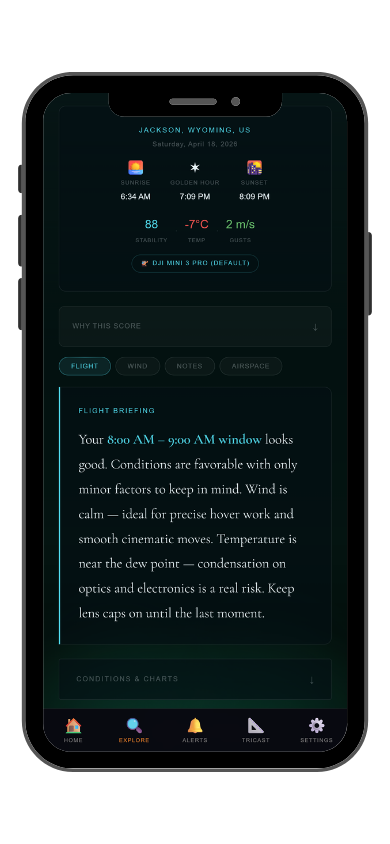
DroneCast scores flight conditions. GoldCast scores golden hour quality. Both in the same LightCast app β€” so you know what light you're flying into before you pick an ND filter.
Common Questions
What are the best camera settings for drone photography?
ISO 100, shutter speed double your frame rate for video (1/60 at 30fps), ND filter matched to brightness, manual white balance. Settings change with light conditions β€” check DroneCast and GoldCast before launch so you know what you're flying into. Free on web or in the iOS app.
What ND filter should I use for drone photography?
ND4 for overcast or golden hour. ND8 for partly cloudy bright sun. ND16 for full midday sun. No ND needed for overcast low-light conditions. Match the filter to the brightness so you can maintain the correct shutter speed for your frame rate.
Should I use auto or manual white balance on a drone?
Manual. Auto white balance shifts as the drone pans across different surfaces and light sources during a flight, creating inconsistent color in edits. Set manually before takeoff and lock it for the entire flight.
What ISO should I use for drone video?
Base ISO (typically 100) whenever possible. Raise ISO only when light genuinely requires it β€” aerial footage amplifies noise more than ground-level photography because sky and smooth terrain show grain clearly. Use ND filters to control exposure before raising ISO.
What is LightCast DroneCast?
DroneCast scores flight conditions using wind, gusts, precipitation, visibility, and temperature. GoldCast (same app) scores golden hour quality and timing. Free on web at lightcastsuite.com/dronecast, both in the LightCast iOS app. $2.99/month after a 7-day free trial.
LightCast
Know what light you're flying into before you pick a filter.

Flight score Β· Golden hour quality Β· Light conditions Β· Saved locations
DroneCast + GoldCast in one app

Download LightCast for iOS
or
Check today's conditions free on web β†’

$2.99/mo after 7-day free trial Β· Cancel anytime in App Store