DroneCast ยท Shoot Planning Guide
LightCast

How to Plan a Drone Photography Shoot

Location, airspace, weather, and light โ€” in that order. Here's the planning framework that stops wasted drives and gets you home with usable footage consistently.

Check Flight + Light Conditions โ€” iOS App Check today's conditions free on web โ†’

iOS app: $2.99/mo ยท 7-day free trial ยท Cancel anytime

Four steps in the right order

The Planning Framework That Prevents Wasted Trips

Most failed drone shoots come from checking things in the wrong order โ€” driving to a location and then discovering the airspace is restricted, or arriving at golden hour to find wind is 25 mph. The order matters as much as the checks themselves.

๐Ÿ“
Step 1: Scout the Location
Use Google Earth or satellite view to assess terrain from altitude before visiting. Look for: visual interest from above (pattern, scale, geometry), access and parking, and obstacles in the flight path. Arrive at golden hour in daylight on a scouting trip if the location is more than 30 minutes away โ€” confirm compositions before committing to a full shoot.
โœ…
Step 2: Verify Airspace
Check FAA B4UFLY or AirMap before every new location. National parks, airport approach paths, military zones, and some state parks prohibit drones entirely. Airspace restrictions are non-negotiable โ€” there's no workaround for restricted airspace, and the fines for unauthorized flights are significant. Check this before planning weather or light.
๐Ÿ’จ
Step 3: Check Flight Conditions
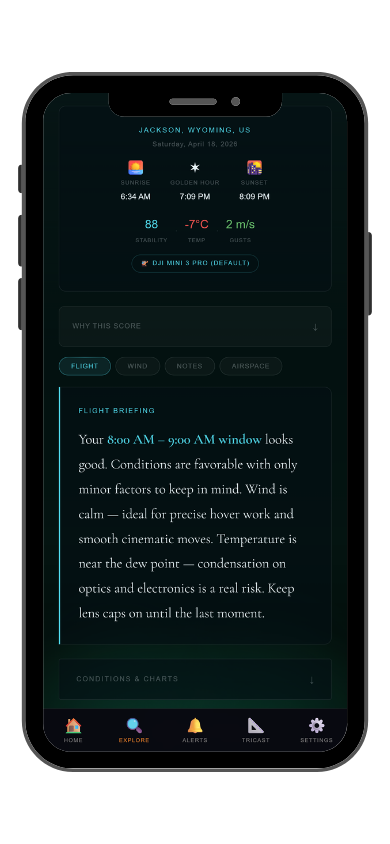
Once location and airspace are confirmed, check DroneCast for wind, gusts, precipitation, and visibility. Do this 3โ€“5 days out for travel planning and again the morning and afternoon of the shoot. Conditions can shift significantly in 24 hours โ€” don't rely on a forecast made three days ago for a go/no-go decision.
๐ŸŒ…
Step 4: Time for Light Quality
Once conditions look flyable, time your arrival for the best light. Golden hour before sunset is the most reliable target for aerial photography โ€” low-angle light, long shadows, warm color. GoldCast calculates the exact golden hour window for your location and date. Plan to be airborne 15 minutes before it begins.
1โ€“2 weeks out
Scout location on satellite view. Verify airspace. Identify backup locations.
3โ€“5 days out
Check DroneCast conditions trend. Watch for frontal systems or wind events.
Day before
Confirm conditions. Check GoldCast golden hour timing. Charge all batteries.
Day of
Final DroneCast check in the afternoon. Arrive 30 min before golden hour.
LightCast DroneCast
๐Ÿ“
DroneCast + GoldCast in One App
Steps 3 and 4 โ€” flight conditions and golden hour timing โ€” are both in the same LightCast app. GoldCast push alerts notify you when the evening looks strong at your saved location, so you know when both the flight window and light are likely to align.
Common Questions
How do you plan a drone photography shoot?
Scout location, verify airspace, check flight conditions, time for light โ€” in that order. DroneCast handles step 3, GoldCast handles step 4 โ€” both free on web or in the iOS app.
How far in advance should I check drone weather?
Watch trends 3โ€“5 days out for travel planning. Make the final go/no-go decision the afternoon of the shoot โ€” conditions can shift significantly in 24 hours. Don't rely on a forecast made three days ago.
Should I scout a drone location before flying?
Yes, when practical. Use satellite view first to assess aerial potential. Visit in person for locations more than 30 minutes away โ€” confirm access, parking, and flight path before committing to a full shoot trip.
What time should I arrive for a golden hour drone shoot?
15โ€“20 minutes before golden hour begins. GoldCast shows the exact start time for your location and date. Being airborne when the light begins rather than just launching is the difference between catching and missing the best moments.
What is LightCast DroneCast?
DroneCast scores flight conditions using wind, gusts, precipitation, visibility, and temperature. GoldCast (same app) scores golden hour quality and timing. Free on web at lightcastsuite.com/dronecast, both in the LightCast iOS app. $2.99/month after a 7-day free trial.
LightCast
Flight conditions and golden hour. Both in one app.

DroneCast flight score ยท GoldCast golden hour ยท Push alerts
Saved locations ยท Multi-day planning ยท All tools in one app

Download LightCast for iOS
or
Check today's conditions free on web โ†’

$2.99/mo after 7-day free trial ยท Cancel anytime in App Store