DroneCast ยท Forecast Guide
LightCast

How to Read a Drone Weather Forecast

A drone weather forecast needs different variables than a standard weather check. Here's what to look for โ€” and how DroneCast translates it into a single flight verdict.

Try LightCast Free โ€” iOS App Check today's forecast free on web โ†’

iOS app: $2.99/mo ยท 7-day free trial ยท Cancel anytime

Photography forecast

What Drone Pilots Need From a Forecast

Opening a weather app and seeing '14 mph winds, partly cloudy' doesn't tell you whether to fly. A drone-specific forecast answers: is it safe to fly, and will conditions support good footage? Those are different questions from anything a standard weather app is designed to answer.

๐Ÿ’จ
Wind: Find Both Numbers
Always find sustained wind AND gust speed separately. A standard weather app often shows only sustained. Gusts are the safety-critical figure โ€” a gust 15+ mph above sustained creates incident risk regardless of what the sustained number looks like. DroneCast shows both.
๐ŸŒง๏ธ
Precipitation: Any Amount Is Relevant
Check precipitation probability but also look at the type. Light drizzle may show as low probability but any precipitation is a no-fly for consumer drones. DroneCast flags drizzle and mist specifically, not just significant rain events.
๐ŸŒก๏ธ
Temperature: Battery Management Factor
Below 40ยฐF, battery capacity starts dropping meaningfully. Below freezing, plan for 20โ€“40% less flight time. The temperature reading changes your battery management decisions โ€” raise your return-to-home threshold on cold days. DroneCast factors temperature into the flight score.
๐Ÿ‘๏ธ
Visibility: FAA Compliance Check
FAA requires 3-mile minimum visibility. Standard weather apps show visibility but don't flag it against the drone-specific threshold. DroneCast checks visibility against FAA minimums and includes it in the flight score alongside wind and precipitation.
LightCast
๐Ÿ“
App Exclusive
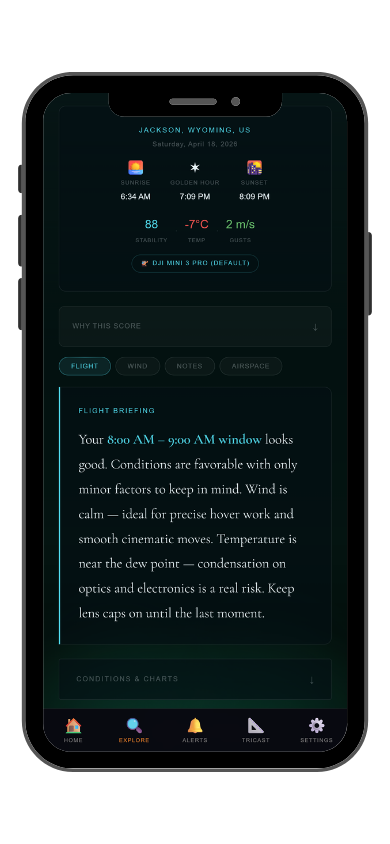
DroneCast is only in the iOS app. It reads the forecast variables that matter for drone pilots and scores them together into a single flight verdict โ€” no interpretation required. GoldCast push alerts notify you when golden hour looks strong, so you know when the full picture aligns.
Common Questions
How do you read a drone weather forecast?
Look for sustained wind AND gusts separately, any precipitation probability, temperature relative to 40ยฐF, and visibility against the 3-mile FAA minimum. DroneCast reads all of these and outputs a single flight score. Free on web, full features in the iOS app.
What weather variables matter most for drone flying?
In order: gusts (safety), sustained wind (battery and footage quality), precipitation (hardware risk), visibility (FAA compliance), temperature (battery management). DroneCast scores all five together so you get one number rather than five to interpret.
Why doesn't a standard weather app work for drones?
Standard apps show sustained wind but often omit gusts. They don't flag precipitation against drone hardware limitations. They don't check visibility against FAA minimums. They're not built around the questions drone pilots actually ask.
How far in advance can I plan a drone flight from the forecast?
Wind and precipitation are reasonably reliable 3โ€“5 days out for planning. Make the final go/no-go the morning of โ€” conditions can shift significantly in 24 hours. DroneCast updates daily so the score is always current.
What is LightCast DroneCast?
DroneCast scores flight conditions using wind, gusts, precipitation, visibility, humidity, and temperature. Free on web at lightcastsuite.com/dronecast, with saved locations in the LightCast iOS app. $2.99/month after a 7-day free trial.
LightCast
Stop interpreting forecasts. Get a flight verdict.

Wind & gusts ยท Precipitation ยท Visibility ยท Temperature
Single flight score ยท Saved locations ยท All tools in one app

Download LightCast for iOS
or
Check today's forecast free on web โ†’

$2.99/mo after 7-day free trial ยท Cancel anytime in App Store