StarCast ยท Phone Astrophotography Guide
LightCast

How to Shoot the Milky Way With a Phone

Modern smartphones can capture the Milky Way โ€” but only under the right conditions. Here's what actually works and what the phone can't overcome.

Try LightCast Free โ€” iOS App Check tonight's sky free on web โ†’

iOS app: $2.99/mo ยท 7-day free trial ยท Cancel anytime

Photography forecast

What Phones Can and Can't Do

Flagship smartphones (iPhone 15 Pro, Pixel 8 Pro, Samsung Galaxy S24 Ultra) have night modes that capture genuine Milky Way detail under the right conditions. The right conditions are more demanding for phones than for dedicated cameras โ€” you need darker sky and a more moonless night to get comparable results.

๐Ÿ“ฑ
Use Night Mode or Astrophotography Mode
Most flagship phones have a dedicated astrophotography or long-exposure night mode. iPhone: use ProRAW and Night Mode with a tripod. Pixel: Astrophotography mode (available when on a tripod with very low light). Samsung: Pro mode with manual settings. Use a tripod โ€” handheld is not viable for Milky Way.
๐Ÿ”ญ
Phones Need Darker Sky Than Cameras
The smaller sensor in a smartphone collects less light per pixel than a dedicated camera. Where a DSLR or mirrorless might work in Bortle 3โ€“4, a phone typically needs Bortle 2โ€“3 for meaningful Milky Way results. Drive further than you think is necessary.
๐ŸŒ‘
New Moon Is Non-Negotiable for Phones
Phones have less dynamic range than dedicated cameras โ€” a partially illuminated sky from a crescent moon will wash out the faint Milky Way signal that a phone sensor is already struggling to capture. Target new moon nights specifically for phone Milky Way photography.
๐Ÿ“
Use a Tripod and a Remote Shutter
Even slight movement during a 15โ€“30 second exposure ruins the shot. A tripod is mandatory. Use a Bluetooth remote or the self-timer to avoid camera shake from touching the screen. Even breathing on the phone during a long exposure can cause blur.
LightCast
๐Ÿ””
StarCast Push Alerts
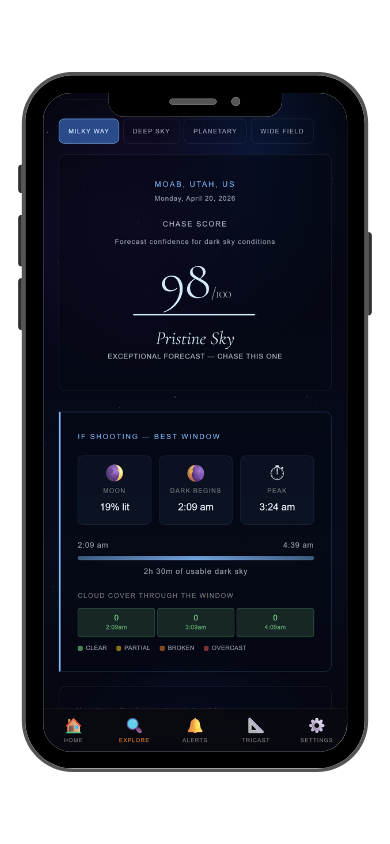
Phone astrophotography needs exceptional conditions โ€” more than dedicated cameras. StarCast scores moon phase, Bortle class, and transparency โ€” the three variables that determine whether a phone can capture meaningful Milky Way detail. Push alert when a high-scoring night is forecast. Exclusive to the iOS app.
Common Questions
Can you shoot the Milky Way with a phone?
Yes โ€” flagship phones with astrophotography modes can capture genuine Milky Way detail, but they need Bortle 2โ€“3 sky and a new moon night to produce meaningful results. Drive further and target darker conditions than you would with a dedicated camera. Check StarCast โ€” free on web.
What phone is best for astrophotography?
iPhone 15 Pro/Pro Max with ProRAW, Google Pixel 8 Pro with Astrophotography mode, and Samsung Galaxy S24 Ultra in Pro mode. All produce comparable results under ideal conditions. The sensor size difference between them is less significant than conditions.
How long should I expose for Milky Way on a phone?
Most phone astrophotography modes handle exposure automatically โ€” typically 15โ€“30 seconds. In manual/Pro mode, start at 25 seconds at the widest aperture and highest ISO the phone offers without excessive noise. Evaluate and adjust.
Do I need a tripod to photograph the Milky Way with a phone?
Yes โ€” absolutely mandatory. Even slight camera shake during a 15โ€“30 second exposure destroys the shot. Use a Bluetooth remote or self-timer to avoid touching the screen during exposure.
What is LightCast StarCast?
StarCast scores night sky conditions using moon phase, Bortle class, transparency, and cloud cover. Push alerts notify you when a high-scoring night is forecast. Free on web at lightcastsuite.com/starcast, push notifications in the LightCast iOS app. $2.99/month after a 7-day free trial.
LightCast
Check if tonight's conditions are good enough for phone astrophotography.

Moon phase ยท Bortle class ยท Transparency ยท Cloud cover
Push alerts ยท Saved locations ยท 3-day outlook

Download LightCast for iOS
or
Check tonight's sky free on web โ†’

$2.99/mo after 7-day free trial ยท Cancel anytime in App Store