StarCast ยท Milky Way Guide
LightCast

Milky Way Photography Tips

The difference between a mediocre Milky Way shot and a strong one usually comes down to conditions, not camera settings. Here are the tips that actually move the needle.

Try LightCast Free โ€” iOS App Check tonight's conditions free on web โ†’

iOS app: $2.99/mo ยท 7-day free trial ยท Cancel anytime

Photography forecast

Tips That Actually Make a Difference

Most Milky Way photography guides focus on camera settings. Settings matter โ€” but conditions, location, and timing matter more. Get those three right and the settings become forgiving. Get them wrong and no settings will save the shot.

๐ŸŒ‘
Chase New Moon, Not Clear Sky
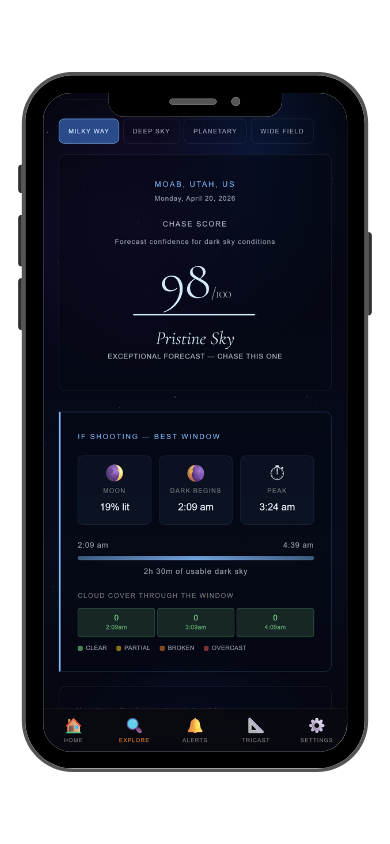
Moon phase is the most impactful variable beginners overlook. A clear night with a half moon is worse than light cloud on a new moon. Target within 5 days of new moon and treat cloud cover as secondary. StarCast shows both together so you don't have to cross-reference.
๐Ÿš—
Drive Further Than You Think You Need To
Most people don't drive far enough from their city. Bortle 4 sky produces disappointing results regardless of settings. Bortle 2โ€“3 is where the core becomes genuinely dramatic. The extra 30โ€“60 minutes of driving is the highest ROI improvement most photographers can make.
โฐ
Arrive Before Dark, Leave After Astronomical Twilight
Scout your composition in remaining light. Wait for astronomical twilight to end โ€” not just sunset โ€” before shooting. The dark window is shorter than most people realise and the best sky is in the final hours before dawn twilight. StarCast shows the dark window timing for your location.
๐Ÿ“ท
Shoot RAW and Expose to the Right
RAW files recover shadow detail that JPEG discards. Expose to protect highlights โ€” a slightly bright histogram recovers better than a dark one in the Milky Way region. Use the histogram, not the preview screen โ€” screens look brighter in dark conditions than the image actually is.
LightCast
๐Ÿ””
StarCast Push Alerts
Set your location and score threshold once. StarCast monitors moon phase, transparency, and cloud cover nightly โ€” sending a push alert when a high-scoring night is forecast. The planning is handled automatically. Exclusive to the iOS app.
Common Questions
What are the most important Milky Way photography tips?
Drive to dark sky (Bortle 2โ€“3), shoot within 5 days of new moon, arrive before dark to scout, and check transparency not just cloud cover. StarCast scores all the conditions variables โ€” free on web, alerts in the iOS app.
What settings should I use for Milky Way photography?
f/1.8โ€“f/2.8, ISO 1600โ€“3200, shutter speed from the 500 Rule (500 รท focal length). Shoot RAW and use the histogram rather than preview screen brightness. Adjust from these starting points based on your specific lens and sensor.
How do I get more detail in my Milky Way photos?
Drive to darker sky, shoot on a more moonless night, and improve atmospheric transparency by targeting post-frontal clear air. Stacking multiple exposures in post-processing also reveals significantly more detail than a single frame.
What ruins a Milky Way shot most often?
Moon above the horizon, too much light pollution, poor transparency from humidity or smoke, and thin cloud that's nearly invisible but scatters enough light to flatten the sky. StarCast checks all four before you go out.
What is LightCast StarCast?
StarCast scores night sky conditions using moon phase, Bortle class, transparency, and cloud cover. Push alerts notify you when a high-scoring night is forecast. Free on web at lightcastsuite.com/starcast, push notifications in the LightCast iOS app. $2.99/month after a 7-day free trial.
LightCast
Check conditions before you chase the Milky Way.

Moon phase ยท Bortle class ยท Transparency ยท Dark window
Push alerts ยท Saved locations ยท 3-day outlook

Download LightCast for iOS
or
Check tonight's conditions free on web โ†’

$2.99/mo after 7-day free trial ยท Cancel anytime in App Store