TriCast ยท Camera Calculators
LightCast

Timelapse Calculator

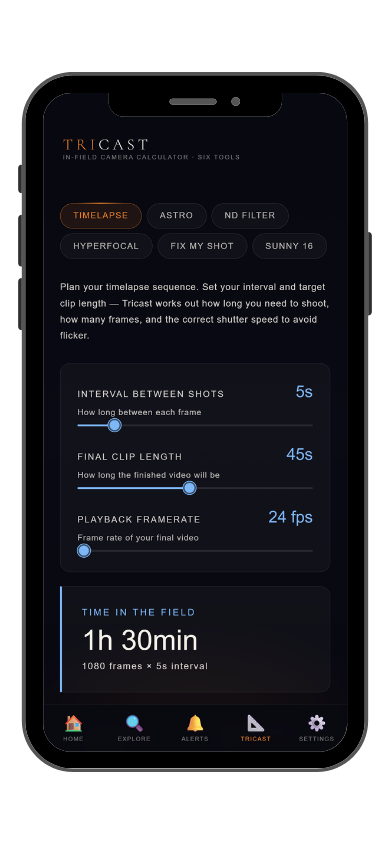
Interval, total shots, clip duration, drive space. TriCast calculates every timelapse variable so you arrive on location with the right settings, not a napkin with math on it.

Calculate Your Timelapse โ€” iOS App Learn More โ†’

iOS app: $2.99/mo ยท 7-day free trial ยท Cancel anytime

The four numbers you need

What TriCast Calculates

A timelapse has four variables that all depend on each other: interval, total frames, shooting duration, and output clip length. Change one and the others shift. Most photographers calculate these manually in the field and get at least one wrong โ€” arriving at a location to find their planned 10-second cloud timelapse would take 4 hours, or that they'll run out of card space after 20 minutes. TriCast solves all four together.

โฑ๏ธ
Interval
How often the camera fires. Shorter intervals for fast subjects (traffic, crowds, 1โ€“3 seconds), longer for slow subjects (clouds, stars, fog burn-off, 5โ€“30 seconds). TriCast lets you input the clip duration you want and calculates back to the interval and shooting time you need for your subject speed.
๐ŸŽฌ
Total Frames and Clip Duration
Clip duration = total frames divided by output frame rate. A 10-second clip at 24fps requires 240 frames. At a 15-second interval, those 240 frames take 60 minutes of shooting time. TriCast calculates all combinations so you can find the interval that fits both your location window and your target clip length.
๐Ÿ’พ
Storage Requirements
500 RAW files at 30MB each is 15GB. A 3-hour Milky Way timelapse at 20-second intervals produces 540 frames โ€” over 16GB in RAW. TriCast estimates total storage based on your camera's file size and format so you know whether your current card is sufficient before committing to a long session.
๐Ÿ“ฝ๏ธ
Frame Rate
24fps for cinematic feel. 30fps for broadcast or social. 60fps for ultra-smooth motion. Output frame rate directly determines how many frames you need for a target clip length, which chains back to required shooting time and interval. TriCast recalculates everything when you change this setting.
LightCast TriCast Timelapse Calculator
Subject-specific guidance

Starting Points by Subject Type

The right interval depends on how fast your subject moves. Stars at wide angle: 20โ€“30 seconds. Fog burn-off: 10โ€“20 seconds. Storm clouds: 3โ€“8 seconds. Golden hour sky transitions: 5โ€“10 seconds. Crowds and traffic: 1โ€“3 seconds. TriCast lets you test different intervals instantly and see how each changes your total shooting time and clip output before you're standing in the dark.

๐Ÿ“
App Exclusive
TriCast is only in the iOS app, alongside StarCast, FogCast, CloudCast, GoldCast, and DroneCast. GoldCast and StarCast send push alerts when conditions are worth the drive โ€” arrive already knowing your timelapse settings for the shoot.
Common Questions
How do I calculate timelapse interval?
Start with the clip duration you want and the output frame rate. Divide frames needed by available shooting time to get interval. TriCast does this calculation instantly and shows you total frames, shooting duration, and storage requirements together โ€” available in the LightCast iOS app.
How many photos do I need for a timelapse?
Clip duration multiplied by output frame rate. A 10-second clip at 24fps needs 240 frames. At a 15-second interval, that's 60 minutes of shooting. TriCast calculates total frames, shooting time, and interval together so you can plan the full session before arriving.
How much storage does a timelapse use?
Depends on file format and camera. RAW files run 20โ€“40MB each. A 2-hour timelapse at 20-second intervals produces 360 frames โ€” roughly 10โ€“14GB in RAW. TriCast estimates storage based on your camera and format so you know if your card is big enough before you start.
What interval should I use for a Milky Way timelapse?
20 to 30 seconds at wide angle is the standard starting point. Shorter than 20 seconds at focal lengths above 24mm may produce star trailing within individual frames that compounds across the sequence. TriCast's NPF Rule calculator helps you find the right exposure length before committing to an interval.
What is LightCast TriCast?
TriCast is a set of camera calculators covering timelapse planning, hyperfocal distance, depth of field, the 500 Rule, NPF Rule, and more. Exclusive to the LightCast iOS app. $2.99/month after a 7-day free trial.
LightCast
Arrive with the right settings, not a guess.

Interval ยท Total frames ยท Clip duration ยท Storage estimate
Frame rate ยท All calculators in one app

Download LightCast for iOS
or
Learn More โ†’

$2.99/mo after 7-day free trial ยท Cancel anytime in App Store